Reflection....something I call myself doing at times, but really it was more of a quick assess of what I have been doing rather than a true, deep rooted reflection - because that hurts sometimes. The #SummerLS (Summer Learning Series) has truly prodded some personal reflection prior to this challenge and some has been very painful in that it revealed some of my flaws.
It all started with the first challenge. Why couldn't I get teachers to engage in Twitter previously, or much less participate in a chat? Suddenly with the summer series, they are! When I saw teachers following me on Twitter, some of whom I have tried to get on for 2 or more years, I was slightly jealous.
I was hurt that those who I saw as friends/colleagues would suddenly jump on the band wagon and didn't trust me enough to even try the many times I attempted to get them connected! (taking it personally) Not to mention, some of them have verbally made it known that the summer is 'their time!", and they would not be participating in any 'school' stuff. (putting blame on them)
Needless to say, I was having a good pity party over this.....using excuses to prolong it as well. I kept asking myself what did I do wrong, rather than what should I have done differently to help the teachers be more successful.
I realize that sometimes I have great ideas but then don't have the means or time to follow through. Wait, let me rephrase part of that, I don't have the means or make the time to follow through! Just like this blog, my intentions were good, but I did not make the time to keep it updated. It will be one of my goals this year, and I will need you, my friends, to help hold me accountable!
Twitter was one of the situations where due to the lack of participation, I stopped having monthly challenges. Well, what did that tell those teachers who were participating? That I did not value their effort in participating? That due to the lack of my own enthusiasm they were not led further in learning more about this social media? I really blew that one!
I then thought about the TED talks I wanted to start. I did one, but only the one. I got discouraged because I only had about 12 teachers participate, so I did not do it again. What I should have realized was that most of those were teachers who had not participated in other outside professional developments before. I should have been celebrating that some teachers were embracing a new form of PD! Note to self: try this again, and stick with it!
If you made it this far, THANK YOU, I could go on and on with all learned from reflecting over this past year. I promise to grow, reflect, and share more.....later! I am so thankful I have grown an extensive PLN now to grow with and lean on!! I am also thankful for this challenge!
Monday, June 30, 2014
Thursday, June 12, 2014
Do You Inspire or Squash?
There is also an element of heartache that comes with watching this because so often we unintentionally (and some intentionally) use words and actions to squash the learning desire in children! Having to put down the starfish, the mom complaining the project had gone too far, the dad making her give up the power tool, and then the most heartbreaking part is when she reads the sign about the science fair (and I get all excited thinking she is still going to do it) and then she uses the glass reflection to apply lip gloss.
Watch:
So do you inspire or squash that desire to learn? Do you offer students opportunities for growth or do you squash that awesome idea because it will be 'too much work' to set up or manage? Be an inspiration! Tell yourself:
Sunday, May 4, 2014
Thoroughly Ashamed as a Blogger!
I love to write, and find therapy in it, but don't do it as often as I should. While attending EdCamp Region 4 yesterday, someone asked me for my blog, and embarrassingly I had to tell her that I had one but did not use it as I should. I was even more embarrassed when I realized it had been almost a year since I posted anything. Thoroughly ashamed!
Yesterday was the second time I have attended an EdCamp! It was AWESOME! It is the type of conference where the sessions of the day are not lined up until everyone shows up and shares what they would like to hear/discuss that day and then the sessions are created. Many of the sessions I went to were about topics I wanted to know more about, but then there was one I had some knowledge of and ended up not only learning but sharing and making some great connections with other educators. Someone from my district made the comment that she loved how people just sat around and SHARED out their great ideas with strangers who left being friends! If you have never attended one, you definitely need to add it to your list of things to do!
Something fun I learned about was Kahoot! You don't need special remote response systems. It is web based and can be run on a laptop, iPad, iPhone, iPod, Android, Chromebook, Windows Phone or PC. Students get immediate feedback in a game-like atmosphere, and teachers can get a resulting spreadsheet with student data input. Fun and easy, check it out!
Yesterday was the second time I have attended an EdCamp! It was AWESOME! It is the type of conference where the sessions of the day are not lined up until everyone shows up and shares what they would like to hear/discuss that day and then the sessions are created. Many of the sessions I went to were about topics I wanted to know more about, but then there was one I had some knowledge of and ended up not only learning but sharing and making some great connections with other educators. Someone from my district made the comment that she loved how people just sat around and SHARED out their great ideas with strangers who left being friends! If you have never attended one, you definitely need to add it to your list of things to do!
Something fun I learned about was Kahoot! You don't need special remote response systems. It is web based and can be run on a laptop, iPad, iPhone, iPod, Android, Chromebook, Windows Phone or PC. Students get immediate feedback in a game-like atmosphere, and teachers can get a resulting spreadsheet with student data input. Fun and easy, check it out!
Monday, May 13, 2013
Posts
Today, I am testing out a new app! It is called "Posts"This app was on a list of FREE apps for today, normally $9.99! It allows me to post to my blogs from my iPad! So far it has been pretty easy to set up, and appears to be user friendly! I was able to upload pics from my Camera Roll which I edited with an app called Camera+.
Monday, December 3, 2012
Appy Hour Starts Today!
I will be hosting an Appy Hour the first Monday of each month (or will try to stick to that schedule). This will be a time where I share apps I think you might find interesting and then open it up for others to share apps they find useful! This could be lots of fun! I am looking forward to input from teachers, administrators and other staff. Feel free to comment and tell me what your favorite apps are! I will post links to apps we have discussed each month on here.
Thursday, September 13, 2012
QR Wonderful! (part 3)
Now that you have played with the QR Codes and have some experience creating them, let's look at some different forms of QR codes and some sites that will spice up your use of them!
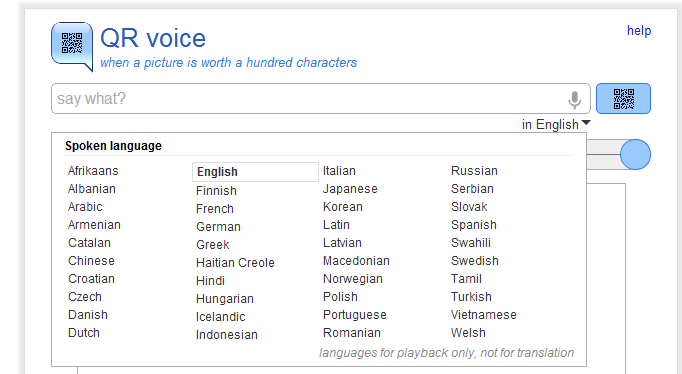
Allows you to create a QR code that produces an audio clip of up to 100 characters in 40 languages. We have used them to make vocabulary activities. A couple of examples would be when introducing new words. Students each received a card with a code on it, scanned it, and then found and stood by the word on the wall that they felt represented the definition. Students then checked with each other to see if they agreed. Another teacher placed her codes on cards around the room: on the wall, under desk, sides of shelves and cabinets, creating a scavenger hunt for students to find and answer. Students absolutely loved it!
QR voice
![]() |
| http://qrvoice.net/ |
QR Stuff
QR Codes in color!![]() |
| http://www.qrstuff.com/ |
QR Treasure Hunt Generator
Create a treasure hunt for your students or staff! I have used it as a professional development activity to spark an interest in the possibilities of using the codes in a class. Teachers loved it. They have lots of pre-made activities also that you can access. Be sure to preview the entire set before using.![]() |
| http://www.classtools.net/QR/ |
QR Codes in Education - LiveBinder
LiveBinders are like three ring binders online where you can store websites, documents and many other items! Here is the link to a blog post I did on LiveBinders February, 2011. The binder can be made public and shared with others, and someone has created a nice one on QR Codes that you can access! When you click on a tab you will see a page or an address you can access.![]() |
| http://www.livebinders.com/play/play_or_edit?id=51894 |
Monday, August 27, 2012
QR Wonderful! (part 2)
So excited this morning when a former teacher, now administrator, shared with me her use of a QR code in a handout for her parents! It linked them to the campus Facebook page where information is posted almost daily. Great use of the code! I would love for others to share ways you have used codes.
You know how to scan now, so how do you create your own codes? There are many ways. I will show you a couple of sources that I use.
i-nigma
I recommended the use of i-nigma as an app on your phone because it has been one of the best I have used, but I also love the website. It allows you to create your own QR codes for websites, text messages, and general information! There are others that do the same such as Kaywa, GoQR.me, and QR Code Generator. I think it all comes down to personal preference, so you may want to check out these others and see which one you like best.
You will notice the format in i-nigma is very easy. You choose whether you want your QR Code to take the scanner to a website link, an embed code, your contact details, or an SMS (text message). I do prizes sometimes in my sessions and will have cards with QR Codes on them with "Winner", or a variety of "You have a winning attitude, but you did not win a prize today!". Teachers love to scan and see if they win something. When I set it up this is what it looks like. I then right click on my code and save the image. If you give it a title, it will save the title within the image, so I usually don't give it a title and just name it when I save it.
Chrome
Another way I create QR codes is using a Chrome extension. If you use Chrome as a browser, you simply go to your Chrome Web Store and search for QR Code Generator - there are dozens! If you use a URL shortener often then you might consider the goo.gl URL Shortener. Not only does it provide a URL shortener but a QR code as well.
You know how to scan now, so how do you create your own codes? There are many ways. I will show you a couple of sources that I use.
i-nigma
I recommended the use of i-nigma as an app on your phone because it has been one of the best I have used, but I also love the website. It allows you to create your own QR codes for websites, text messages, and general information! There are others that do the same such as Kaywa, GoQR.me, and QR Code Generator. I think it all comes down to personal preference, so you may want to check out these others and see which one you like best.
You will notice the format in i-nigma is very easy. You choose whether you want your QR Code to take the scanner to a website link, an embed code, your contact details, or an SMS (text message). I do prizes sometimes in my sessions and will have cards with QR Codes on them with "Winner", or a variety of "You have a winning attitude, but you did not win a prize today!". Teachers love to scan and see if they win something. When I set it up this is what it looks like. I then right click on my code and save the image. If you give it a title, it will save the title within the image, so I usually don't give it a title and just name it when I save it.
This is what the person scanning the code sees on their phone!
Chrome
Another way I create QR codes is using a Chrome extension. If you use Chrome as a browser, you simply go to your Chrome Web Store and search for QR Code Generator - there are dozens! If you use a URL shortener often then you might consider the goo.gl URL Shortener. Not only does it provide a URL shortener but a QR code as well.
Those are the two most common ways I create codes! This week I want you to try creating two codes, one for a website and one for a message! Feel free to share with me. You can email your codes to me at morelandj@navasotaisd.org. Only share if you don't mind my using it in my blog at some point possibly!
Tuesday, August 21, 2012
QR Wonderful! (part 1)
This is one of a series on QR codes. If I put it all in one post, I am afraid you would not read it! I know I probably would not. I was able to do a few sessions on campuses last year with QR Codes and all of the teachers really seemed to enjoy it. Some put what they learned to use immediately, and many have asked for a refresher session on it. Hopefully, you will be able to begin using QR Codes educationally by the time this series is finished!
Many of you are probably still wondering what is all the excitement about QR Codes. The answer to that is that with one scan of a code you can have various types of information at your fingertips! What exactly are QR codes? Here is a simple explanation:
You now need to download an app for a scanner. There are many scanners out there, and most are free. My favorite scanner so far is i-Nigma. It seems to run the fastest, the easiest, and is available for almost all SmartPhones. I also like this app because the website is very user friendly when it comes to creating your own codes, but we will discuss that in a later session. So go download a scanner so you can practice using it with the code below!
You should have seen this blog show up on your phone when you scanned it! This was linked to a website, but you can link to prepared messages by you, text messaging, and contact info.
Until Part 2 of this series, I want you to look around for QR Codes and scan them to see what type of information you might find. You might be surprised! Some common places you might find QR Codes:
Part 2: Creating your own QR Codes
Many of you are probably still wondering what is all the excitement about QR Codes. The answer to that is that with one scan of a code you can have various types of information at your fingertips! What exactly are QR codes? Here is a simple explanation:
You now need to download an app for a scanner. There are many scanners out there, and most are free. My favorite scanner so far is i-Nigma. It seems to run the fastest, the easiest, and is available for almost all SmartPhones. I also like this app because the website is very user friendly when it comes to creating your own codes, but we will discuss that in a later session. So go download a scanner so you can practice using it with the code below!
Until Part 2 of this series, I want you to look around for QR Codes and scan them to see what type of information you might find. You might be surprised! Some common places you might find QR Codes:
- in magazines - usually lead to websites of the product, or more information about something on the magazines page
- on posters - saw one in my doctor's office that led to a health and wellness website or to purchase tickets for an event
- on plant tags - take you to information about how to care for that plant
- business window - leads to business website, facebook, twitter, or other social media
- business cards - gives you contact info you can add to your phone
Part 2: Creating your own QR Codes
Friday, August 17, 2012
Skype in the Classroom
How exciting to be able to connect with others around town, across states, or even in other countries! Skype is a simple tool that can enrich your lessons, engage your students, and connect your class to places and people they may never get an opportunity to go or meet.
Introducing Skype in the classroom from Skype in the classroom on Vimeo.
Teachers in our district have successfully used Skype! From connecting with a couple in Peru about geography and culture, talking with a professor on a ship in the Antarctica, and even skyping with local businesses our students are always in engaged in this activity. They love being able to ask questions of the "experts"!
There are authors who will Skype, some for small fees and some for free. Visit "Skype an Author Network" to find out more.
Skype has provided "Skype in the Classroom" as a way to find experts and other classes to Skype. If you are looking for an expert you would simply complete the fill in with a subject and it will provide a list of possible connections.
If you create a project and would like to include Skyping opportunities, you can add your project to the Skype in the Classroom project section where other classes can read and join. You can also go there to find a project for your students to participate in if you are not quite ready to branch out with your own.
There are unlimited possibilities for using Skype in the Classroom! Please share any opportunities, ideas, and thoughts about ways you have used or plan on using Skype in the Classroom. Other teachers/readers would love to hear!
Introducing Skype in the classroom from Skype in the classroom on Vimeo.
Teachers in our district have successfully used Skype! From connecting with a couple in Peru about geography and culture, talking with a professor on a ship in the Antarctica, and even skyping with local businesses our students are always in engaged in this activity. They love being able to ask questions of the "experts"!
There are authors who will Skype, some for small fees and some for free. Visit "Skype an Author Network" to find out more.
Skype has provided "Skype in the Classroom" as a way to find experts and other classes to Skype. If you are looking for an expert you would simply complete the fill in with a subject and it will provide a list of possible connections.
If you create a project and would like to include Skyping opportunities, you can add your project to the Skype in the Classroom project section where other classes can read and join. You can also go there to find a project for your students to participate in if you are not quite ready to branch out with your own.
There are unlimited possibilities for using Skype in the Classroom! Please share any opportunities, ideas, and thoughts about ways you have used or plan on using Skype in the Classroom. Other teachers/readers would love to hear!
Tuesday, August 14, 2012
Exceeds the size limit? Not anymore!
How many times have you started to email a file and suddenly you get a pop up that says the file is too large? Many email services limit the amount or types of files you can attach. I am currently limited to 25MB and cannot attach any executable files. While checking out the Navasota ISD Pinterest page the other day, I came across a pin by another follower.
Pastelink.me solves this problem! Without creating an account you can share files up to 250MB, and by creating an account you can share up to 2GB.....all for FREE! I tested it out using a video and an executable file. You simply drag and drop your file into the designated area and then it produces a link to paste into your email. The recipient simply clicks on the link and saves the file. Each file is stored for 7 days allowing the recipient(s) time to download.
Thursday, August 9, 2012
Tagxedo - Word Cloud Creator with some UMPH!
Tagxedo is not just another word cloud creator! It has lots of bells and whistles that some of the others don't have, and we all know that educators like LOUD bells and LOTS of whistles! Upon clicking on the home page of Tagxedo you will see:
Notice, you already have lots of options! My favorite is (1) URL! You can add a web address and make a word cloud out of it, or you can click Start Now in the upper left and put in your own text! Then you have more bells and whistles to choose from!
For those of you who know me well, you know a coffee cup fits me. However, I imagine you sitting back with a cup of coffee reading this post, and thinking "I want to try this!" Have fun with Tagxedo! Please share in the comment section ideas for using in your classroom.
UPDATE:: A teacher sent me a Tagxedo she did for her classroom that features the Junior High activities of the campus where she teaches. They are known as the Fangs, so the snake shape is appropriate! Just had to share!
Notice, you already have lots of options! My favorite is (1) URL! You can add a web address and make a word cloud out of it, or you can click Start Now in the upper left and put in your own text! Then you have more bells and whistles to choose from!
Here is a picture of this blog in Tagxedo! Of course, I will change some of it because I can! Notice under RESPINS, you have the options to change the color, theme, font, orientation, layout, or all of it! I want my colors to be similar to the colors in my blog, so I can respin until I find them or I can click on the arrow by theme and pick one from a list. Now under options, I go to Word/Layout and choose some words I want to skip (like my initials JAM, comments, and posts). Last but not least, I want to pick a shape for my word cloud!
UPDATE:: A teacher sent me a Tagxedo she did for her classroom that features the Junior High activities of the campus where she teaches. They are known as the Fangs, so the snake shape is appropriate! Just had to share!
Monday, August 6, 2012
Goggle for Google!
Yes, our district loves Google! Well, at least most of the staff does! I have teachers say that, but once they understand how things work they quickly become fans. We have found so many benefits in using Google Apps with not only the staff but our students as well. Students have taken the initiative to submit homework through their Google Mail accounts, collaborate with each other on Science and History Fair projects, vote for officers using the Form created in Google by a teacher, and much, much more. We even had a parent complain because their child was monopolizing the home computer completing and submitting homework through email!
Google is "ever changing"! They often provide surveys as a way to see what is working, what is needed, and to get input from users. This year they have switched from what we know as "Google Docs" to "Google Drive". What is the difference you may ask? Here is a short video that explains!
Hopefully this video helped you understand some of the changes you will see!
Google is "ever changing"! They often provide surveys as a way to see what is working, what is needed, and to get input from users. This year they have switched from what we know as "Google Docs" to "Google Drive". What is the difference you may ask? Here is a short video that explains!
Hopefully this video helped you understand some of the changes you will see!
Tuesday, July 31, 2012
Remind 101
Another great communication tool for teachers to use with parents! (I could see this being used by lots of different groups as well: youth groups, departments, athletics, clubs, etc.)

![]() |
| Parent view from teacher, Mrs. Jones |
Simple steps to use:
- create account
- will allow you to set up different classes
- send home printable PDF to parents that tell them how to sign up for the texts (they can text a number or email) It is NOT your cell number!!
- They receive a text saying they successfully signed up!
Now as the creator you can simply login to the site and send a message, and anyone who has signed up will receive this message. The recipient does not have access to your phone number and it does not allow them to text you back.
As a smartphone user, you can download the Remind 101 app now for your iPhone, iPad, or Droid. The best thing about this program is it is all FREE!! Got to love free stuff that works!
Wednesday, July 25, 2012
Navasota ISD is on Pinterest!
Yes that is right! Why Pinterest? We thought we would meet the teachers and parents where they are, and most are on Pinterest! If you are not familiar with Pinterest it is a bookmarking system that uses pictures. How many times have you gone back looking for a bookmark and had to click on several before you found the one with that bulletin board idea that you wanted!
We have 41 boards with lots of links to lessons, productivity tools, subject specific ideas, and appropriate grade levels.
Check us out! If you have some great sites that you think we need to share, please send them to me.
morelandj@navasotaisd.org
We have 41 boards with lots of links to lessons, productivity tools, subject specific ideas, and appropriate grade levels.
Check us out! If you have some great sites that you think we need to share, please send them to me.
morelandj@navasotaisd.org
Tuesday, July 24, 2012
Chrome for your toys!
Yeah! Chrome now has apps for your iPhones, iPads, and Droids! I downloaded it to my iToys and so far am loving it.
When I logged in, I was able to access all of my bookmarks from my desktop. This makes it especially beneficial when I am on the go!
Don't wait! Give it a try!
When I logged in, I was able to access all of my bookmarks from my desktop. This makes it especially beneficial when I am on the go!
Don't wait! Give it a try!
Once again . . .
Once again I am going to try to do a better job of posting! I think my problem in blogging is that I think there needs to be a substantial article to go with any post! Sometimes I just want to share something and don't because I don't feel I have enough to write something substantial. Make sense? I have discovered that most of my followers don't want a "story/article", they just want to know what is out there they can use in the classroom. I am going to try to keep my posts short and sweet! Hope you are enjoying your summer!!
Tuesday, November 1, 2011
Sliderocket
Sliderocket is a new presentation tool! As a district who uses Google Apps for Education, we are able to use it for free (it is now under "more"). They do offer a "Lite" version that is free with some basics available. The paid versions offer analytics and more advanced features. The ease of using this makes it even more appealing! Have a lot of PowerPoints or Google Presentations that you already use?....no problem, you can upload them into Sliderocket. You really need to explore it to see all of the great possibilities!! Below is a sample of one I created - and had fun doing so!
Wednesday, October 26, 2011
A Google A Day
Students (and adults!) can sharpen their search skills using "a Google a Day" ! A new question is presented each day and you search for the answer by "Google-ing" it! Then you submit your answer to determine if you are right or you need to go search again. It may not be as easy as you are thinking!!
![]() |
| This is the question for October 26! |
Thursday, October 20, 2011
Artsonia . . . the world's largest kids' art museum!
Artsonia...an online art museum. Showcasing art from students, this site offers free accounts for teachers to upload student art. They offer thousands of art project lesson plan starters submitted by other teachers. Students will take a real interest in their work knowing it will be published on the web!
One of the greatest features is that it offers a "gift shop" where parents can order items such as:
- canvas art
- coffee mugs
- tote bags
- mousepads
- keychains
- tshirts
- and much more!
Amazing Daze in DC
This summer I was asked to go on the Teach America History trip to the DC area and blog our travels. It was quite the trip to say the least. This is one of those trips where you need a few days of rest to recuperate from after it is over! We were up and running early each day and arriving at the hotel in time for bed. Being a History minor, this trip was extremely awesome for someone who has a love of history. I wanted to share the link so you could see just where we went and what we got to see!
Subscribe to:
Posts (Atom)